What the document statuses mean
Audience: All users Time: 2 minutes
Every document on the Documents page has a status pill. Hover or tap a pill to see what it means. The ? next to the Status column opens this diagram.
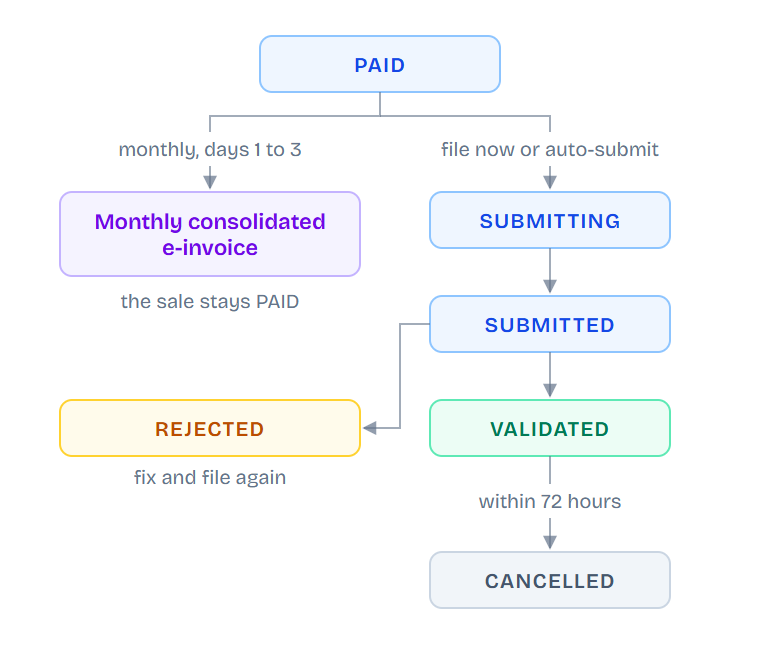
PAID sales are not late. Walk-in sales go into one consolidated e-invoice for the month, filed on days 1 to 3 of the next month. The sale itself stays PAID.
The statuses
| Status | What it means | What to do |
|---|---|---|
| PAID (walk-in) | Waiting for the monthly consolidated e-invoice. | Nothing. envoice files it on days 1 to 3 of next month. |
| PAID (already consolidated) | Included in the monthly consolidated e-invoice. | Nothing. |
| PAID (named buyer) | Recorded in envoice, not sent to LHDN yet. | Open it and submit, or turn on auto-submit. |
| SUBMITTING | envoice is sending it to LHDN now. | Wait a few seconds. |
| SUBMITTED | LHDN has it and is still checking it. | Usually done in seconds. If it stays here, see Submitted but not validated. |
| VALIDATED | LHDN accepted it. It has a UUID and QR code. | Nothing. You can cancel it within 72 hours if needed. |
| REJECTED | LHDN refused it. | Open it to see the reason, fix it and file again. See Why was it rejected?. |
| FAILED | Filing did not go through. | Open it to see why and try again. See Submission failed. |
| CANCELLED | Cancelled at LHDN within 72 hours, or voided before filing. | Nothing. Issue a new document if needed. |
| DRAFT | Not finished yet. | Finish and save it. |
Where to see the monthly e-invoice
Open Consolidated to see the walk-in sales waiting for this month and the consolidated e-invoices already filed. See Consolidated e-invoices.