e-Invoice template in Malaysia: the mandatory fields LHDN expects
Updated 12 November 2026
Short answer
A Malaysian e-invoice has no fixed template to download. It is structured data sent to LHDN MyInvois, and LHDN's e-Invoice Guideline lists 55 fields it can carry: about half are required on every e-invoice, some apply only in certain cases, and the rest, including all the payment details, are optional.
Why there is no template to download
An e-invoice is a data file in XML or JSON that your system, or the MyInvois Portal form, sends to LHDN for validation. The PDF your buyer sees is only a visual representation of that data, and LHDN lets businesses keep any visual format they already use. So when people search for an e-invoice template or format, what they need is the list of fields the data must carry. LHDN publishes it as Appendix 1 of the e-Invoice Guideline.
The 55 fields, grouped
The tables below follow Appendix 1 of the guideline (version 4.8). A field LHDN does not label is required. LHDN labels the others Optional, or mandatory only where they apply, such as an SST number for an SST-registered business. MyInvois still checks the format of whatever you send, for example that a unit code is on LHDN's list.
Supplier (you)
| Field | What it holds | In Appendix 1 |
|---|---|---|
| Supplier's name | Your business or personal name as the issuer | Required |
| Supplier's TIN | Your LHDN tax identification number | Required |
| Registration or ID number | 12-digit SSM number for a business; MyKad or MyTentera for a Malaysian; passport, MyPR or MyKAS for a non-Malaysian | Required |
| SST registration number | Your sales tax or service tax registration | If SST-registered |
| Tourism tax registration number | For tourism tax registrants, such as hotel operators | If registered |
| MSIC code | 5-digit code for your business activity | Required |
| Business activity description | What your business does | Required |
| Address | Registered, business or home address | Required |
| Contact number | Office, mobile or fax | Required |
| Your email address | Optional |
Buyer
| Field | What it holds | In Appendix 1 |
|---|---|---|
| Buyer's name | The person or business receiving the e-invoice | Required |
| Buyer's TIN | The buyer's LHDN tax identification number | Required |
| Registration or ID number | SSM number, MyKad, MyTentera, passport, MyPR or MyKAS | Required |
| SST registration number | The buyer's SST registration | If SST-registered |
| Address | Registered, business or home address | Required |
| Contact number | Office, mobile or fax | Required |
| The buyer's email address | Optional |
When a buyer has no TIN you can use, LHDN provides general TINs, such as EI00000000010 for the general public and EI00000000020 for a foreign buyer. Each has strict cases where it is allowed, and since 1 August 2026 a business buyer's TIN must match its SSM number. See how to find a TIN and the buyer details LHDN checks.
Invoice details
| Field | What it holds | In Appendix 1 |
|---|---|---|
| e-Invoice version | The e-invoice format version, for example 1.0 | Required |
| e-Invoice type | Invoice, credit note, debit note, refund note, or a self-billed version | Required |
| e-Invoice code or number | Your own document number, such as INV12345 or CN23456 | Required |
| Date and time | When the e-invoice is issued; must be the current date and time | Required |
| Original e-Invoice reference number | LHDN's unique identifier of the e-invoice a note adjusts | Notes only |
| Issuer's digital signature | See the note below the table | Listed |
| Invoice currency code | The currency of the amounts, for example MYR | Required |
| Currency exchange rate | Rate used to convert to ringgit | Non-ringgit invoices |
| Frequency of billing | Daily, monthly, yearly and so on | Optional |
| Billing period | The period the invoice covers | Optional |
Appendix 1 lists a digital signature, but envoice files through version 1.0 of the MyInvois API, which accepts documents without one. You need only your MyInvois Client ID and Client Secret. See digital certificates. The date and time rule matters for old sales: envoice files each document with the time it is actually submitted, so a sale from last week is not rejected for its date.
Line items
| Field | What it holds | In Appendix 1 |
|---|---|---|
| Classification | LHDN code for the kind of product or service | Required |
| Description | What you sold | Required |
| Unit price | Price of one unit | Required |
| Quantity | Number of units | Optional |
| Measurement | Unit of measure, for example piece | Optional |
| Subtotal | Line amount before tax, charges and discounts | Required |
| Discount rate and amount | Discount on the line or the whole invoice | Optional |
| Fee or charge rate and amount | Extra charge on the line or the whole invoice | Optional |
| Tax type | Sales tax, service tax, tourism tax and so on, per line and for the invoice | Required |
| Tax rate | The percentage or specified rate | Where a rate applies |
| Tax amount | Tax payable, per line and for the invoice | Required |
| Details of tax exemption | Why the line is exempt, for example the buyer's sales tax exemption certificate number | If exempt |
| Amount exempted from tax | Total tax exempted for sales or service tax | If exempt |
A sale with no buyer TIN that goes into the monthly consolidated e-invoice uses classification 004. LHDN works out the document tax as the sum of the tax on each line, which is why a discount given before tax has to reduce the lines it applies to.
Totals
| Field | What it holds | In Appendix 1 |
|---|---|---|
| Total excluding tax | Amount payable after discounts and charges, before tax | Required |
| Total including tax | Amount payable with all tax | Required |
| Total payable amount | Total with tax and rounding, less any amount paid in advance | Required |
| Total net amount | Amount after line and invoice discounts and charges, before tax | Optional |
| Rounding amount | Rounding added to the amount payable | Optional |
| Total taxable amount per tax type | Taxable amount for each tax type | Optional |
Payment
| Field | What it holds | In Appendix 1 |
|---|---|---|
| Payment mode | Cash, cheque, bank transfer, card, e-wallet and so on | Optional |
| Supplier's bank account number | Where the buyer pays you | Optional |
| Payment terms | When and how payment is due | Optional |
| Prepayment amount, date and reference | Any amount the buyer paid in advance | Optional |
| Bill reference number | Your internal billing reference | Optional |
Imports, exports and goods shipped to someone other than the buyer need extra fields in an annex, such as the customs form reference, tariff code and shipping recipient. Those are listed in Appendix 2 of the same guideline.
What the e-invoice carries after LHDN validates it
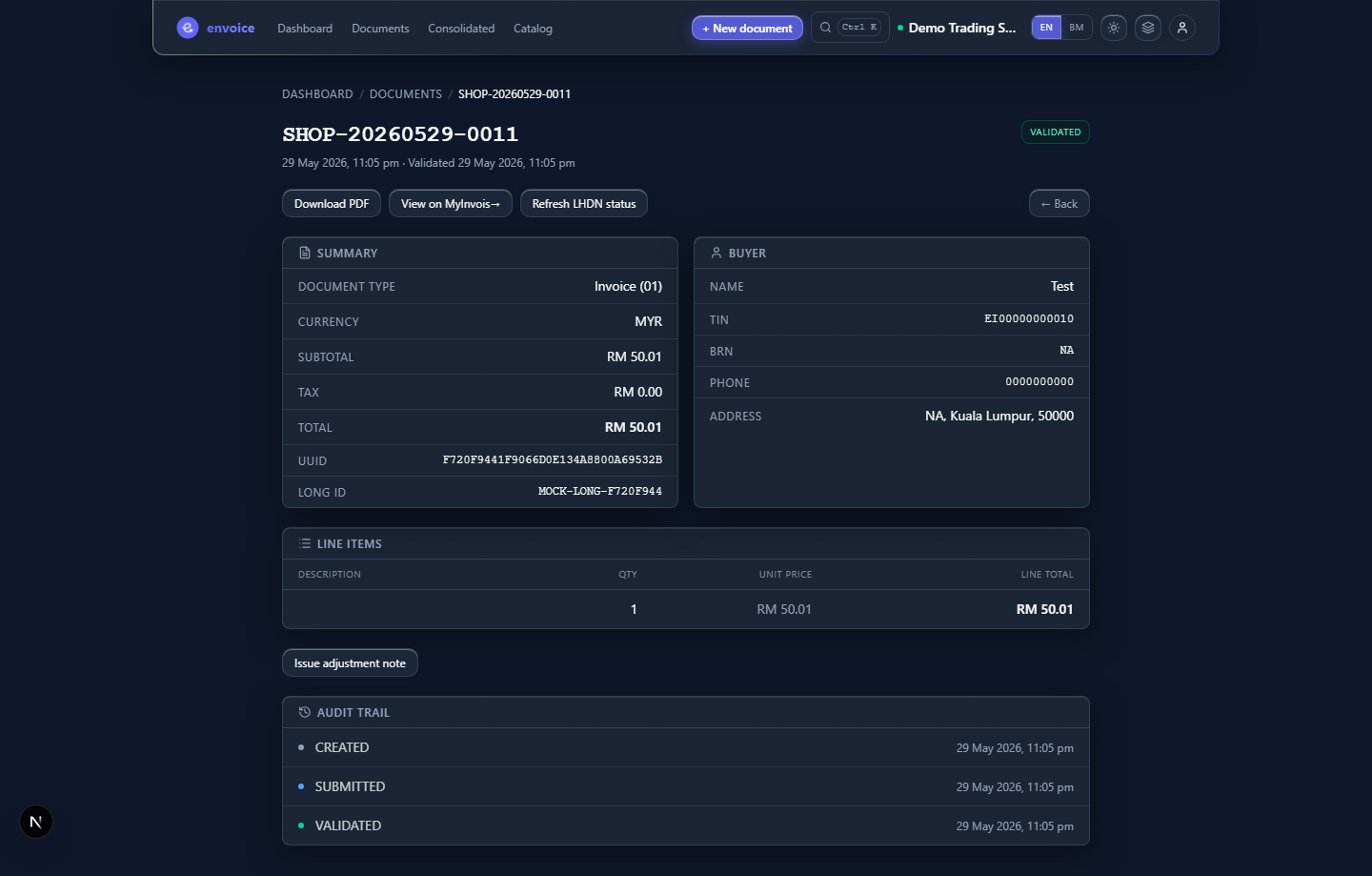
Once LHDN validates the e-invoice, it is assigned a unique identifier number (the UUID), the date and time of validation, and a validation link. When you share the PDF with your buyer, it must include a QR code that the buyer can use to check the e-invoice and its status on the MyInvois Portal. To see what a link or QR holds, paste it into the validation link and QR checker. A document LHDN rejects gets none of these; see LHDN rejection codes.
SST invoice format and the e-invoice are not the same thing
An SST invoice follows the Sales Tax Act 2018 and Service Tax Act 2018, which Customs (RMCD) administers. An e-invoice follows LHDN's rules under the Income Tax Act and goes through MyInvois. They are different documents under different laws, and one does not replace the other.
They do meet on the page. LHDN drew up Appendix 1 with the SST Acts in mind, and it shares e-invoice data with Customs. An SST-registered business still shows its SST details: the e-invoice carries your SST registration number, and each line carries its tax type, rate and amount. LHDN also says that if your visual e-invoice includes the particulars the Service Tax Regulations 2018 require, you can use the same document for service tax. Which particulars an SST invoice needs is a Customs rule, so check it with RMCD. For tax codes and rates on the e-invoice, see e-invoice and SST.
How envoice fills these fields
- Supplier: entered once under Settings > Profile, including your MSIC code and SST registration, and added to every document.
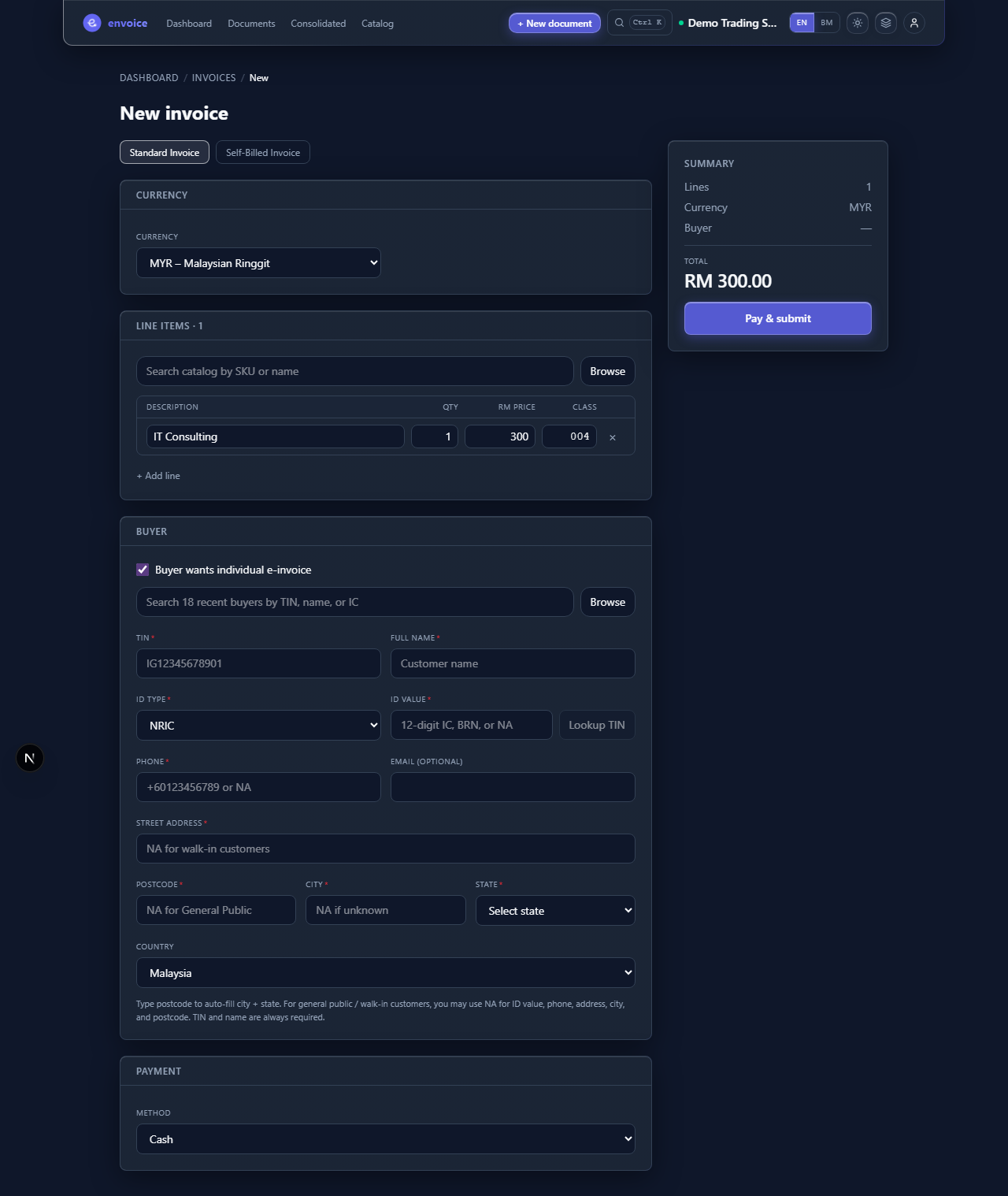
- Buyer: typed on the invoice form or picked from saved customers, with Lookup TIN to fetch the matching TIN from LHDN.
- Line items: from your catalog, with the classification code filled in.
- Invoice details and totals: version, type, number, date and every total are set by envoice when you submit.
Credit, debit and refund notes add the original e-invoice reference for you. See credit, debit and refund notes, the create an invoice guide, and what envoice does.
Frequently asked questions
Is there an official e-invoice template in Malaysia?
No. An e-invoice is structured data sent to LHDN MyInvois, not a page layout. LHDN publishes the list of fields it must carry in Appendix 1 of its e-Invoice Guideline, and lets businesses keep any visual format for the PDF they share.
How many fields does a Malaysian e-invoice have?
LHDN lists 55, grouped into supplier, buyer, invoice details, line items, totals and payment. About half are required on every e-invoice, some apply only in certain cases, such as an SST number or an exchange rate, and the payment fields are all optional.
Is an SST invoice the same as an e-invoice?
No. An SST invoice follows the SST Acts administered by Customs, while an e-invoice follows LHDN rules and goes through MyInvois. An SST-registered business shows its SST registration number and the tax type, rate and amount per line on the e-invoice, and LHDN says a visual e-invoice that includes the particulars required by the Service Tax Regulations 2018 can also serve for service tax.
What does a validated e-invoice show?
LHDN assigns it a unique identifier number (UUID), the date and time of validation and a validation link. The PDF you share with the buyer must include a QR code the buyer can use to check the e-invoice on the MyInvois Portal.
Do I need a digital signature on my e-invoice?
Not with envoice. The guideline lists a digital signature, but envoice files through version 1.0 of the MyInvois API, which accepts documents without one, so you only need your MyInvois Client ID and Client Secret.