How to find a TIN number in Malaysia for e-invoicing
Updated 12 November 2026
Short answer
Malaysian citizens and permanent residents aged 18 and above get a TIN automatically, and can check it on MyTax, through the HASiL Contact Centre (03-8911 1000) or at a HASiL office. For a buyer, ask for their TIN with their IC or 12-digit SSM number, or look the TIN up from that ID with LHDN's TIN search; a buyer with no TIN goes under one of LHDN's general TINs.
What a TIN is and why an e-invoice needs it
A TIN (tax identification number) is the number LHDN uses to identify a taxpayer. Every e-invoice carries the supplier's TIN and the buyer's TIN. LHDN checks the buyer's TIN against the ID number on the same e-invoice, and if the two do not belong to the same taxpayer, the whole document is rejected.
A few format rules from LHDN's MyInvois FAQ save a lot of rejections. The free TIN format checker runs them for you:
- An individual TIN starts with IG. It replaced the older OG and SG prefixes; the digits stayed the same.
- A TIN is at most 14 characters, prefix included.
- Drop any zeros right after the prefix: C01234567890 is entered as C1234567890.
- A non-individual TIN, such as a company TIN starting with C, always ends with 0. If yours does not, add a 0 at the end.
How to find your own TIN
Individuals (MyKad)
LHDN registers a TIN automatically for Malaysian citizens and permanent residents aged 18 and above, using National Registration Department (JPN) data. You do not apply for it. To see it, log in to MyTax and check your profile, call the HASiL Contact Centre at 03-8911 1000, or visit any HASiL office. Foreigners and temporary residents apply for a TIN online through e-Daftar on MyTax, which has been the only route since 1 January 2024.
Companies (BRN)
A company incorporated online with SSM through MyCoID gets its company TIN automatically. Other companies apply through e-Daftar on MyTax, with their SSM documents. Once registered, the TIN shows in the company's profile information in MyTax. The person who manages the company's tax affairs can check it there, or call the HASiL Contact Centre.
Sole proprietors
A sole proprietorship does not have its own company TIN. The owner's individual IG TIN goes on the e-invoice, together with the business's SSM registration number as the BRN.
Your shop in envoice
When you set up your shop, or later under Settings > Profile, choose NRIC or BRN as the ID type, type your IC or SSM number and click Lookup TIN. envoice asks LHDN for the TIN on record for that ID and fills it in, so your supplier TIN always matches your ID.
How to get a buyer's TIN
- Ask the buyer for their TIN together with their ID: the 12-digit SSM number for a company, MyKad for a Malaysian individual, or passport for a foreigner.
- If they do not know the TIN, take the ID number and look the TIN up. LHDN's TIN search returns the TIN that matches the ID type and number. In envoice, tick Buyer wants individual e-invoice on a new invoice, choose the ID type, type the ID value and click Lookup TIN.
- If you only have the company name, find its SSM number first, then look up the TIN from that number.
- If Lookup TIN finds nothing, ask the buyer to confirm their TIN in MyTax.
- Save the buyer under Customers, so the next invoice uses the same checked details.
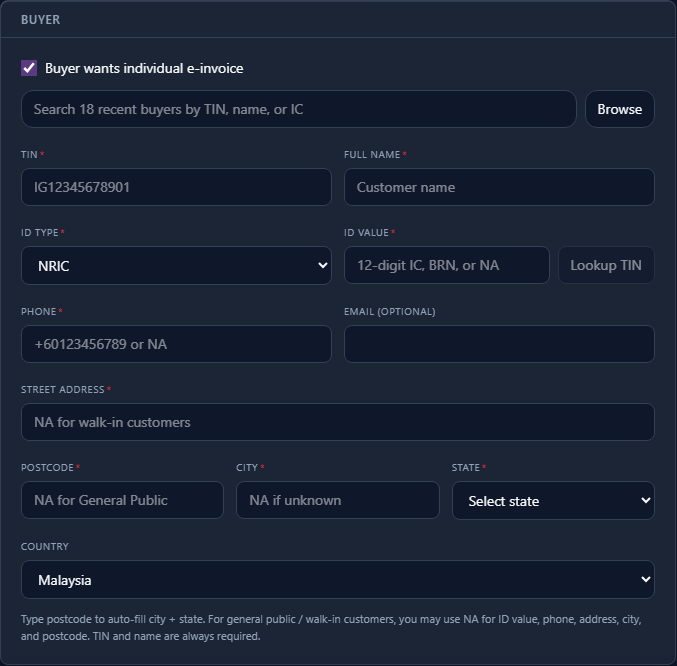
For step 3, see how to find a company's SSM number by name. On a live shop, Lookup TIN runs on your own MyInvois Client ID and Client Secret, so save them in the LHDN tab first.
At a busy counter, it is faster to let buyers type their own details. With envoice's buyer request portal, the buyer scans a QR code on the receipt and fills in their TIN and ID; the form has its own Lookup TIN button, and envoice checks the TIN against the ID with LHDN before filing. Setup steps are in the help guide Collect buyer TINs at the counter.
When the buyer has no TIN: general TINs
LHDN provides general TINs for parties with no TIN you can use. Each has a fixed purpose:
| General TIN | Use for |
|---|---|
| EI00000000010 | General public: the buyer on a consolidated e-invoice, and a Malaysian individual who gives only a MyKad or MyTentera number. |
| EI00000000020 | Foreign buyer: a foreign individual who gives only a passport, or an export buyer with no TIN. |
| EI00000000030 | Foreign supplier with no TIN, on a self-billed e-invoice. |
| EI00000000040 | Government buyers: federal and state government, government and local authorities, statutory bodies and exempt institutions with no TIN. The BRN must be NA. |
LHDN rejects EI00000000010 on an individual e-invoice to a business buyer, and EI00000000020 used for a foreign supplier (that case takes 030). Steps for that case: how to file a self-billed e-invoice.
The TIN and BRN must match (since 1 August 2026)
From 1 August 2026, LHDN validates a business buyer's TIN together with its BRN. A TIN that passed before can now fail if it belongs to a related company, or if the BRN is in the old format or left as "NA". envoice blocks a Malaysian business buyer with no BRN before the document reaches LHDN and asks for the 12-digit SSM number. Foreign business buyers and Labuan entities (TIN starting with LE) have no SSM number, so envoice does not ask them for one.
If a document comes back rejected, the codes and fixes are listed in LHDN e-invoice rejection codes. Lookup TIN, the buyer request portal and saved customers are covered on the features page.
Frequently asked questions
How do I check my TIN number in Malaysia?
Log in to MyTax at mytax.hasil.gov.my and look at your profile, call the HASiL Contact Centre at 03-8911 1000, or visit a HASiL office. Citizens and permanent residents aged 18 and above already have a TIN registered automatically.
Is my TIN the same as my IC number?
No. Your TIN is issued by LHDN and an individual TIN starts with IG. On an e-invoice your IC goes in the ID field and your TIN in the TIN field, and LHDN checks that the two belong to the same person.
Can I find a company's TIN from its BRN?
Yes. LHDN's TIN search returns the TIN registered against a 12-digit SSM number, and envoice runs it when you click Lookup TIN. For a sole proprietor, look up the owner's TIN by MyKad instead, because a sole proprietorship files under the owner's individual TIN.
What TIN do I use if the buyer has no TIN?
Use LHDN's general TINs: EI00000000010 for the general public or a Malaysian who gives only a MyKad, EI00000000020 for a foreign buyer, EI00000000030 for a foreign supplier on a self-billed e-invoice, and EI00000000040 for government buyers with no TIN.
Why was my e-invoice rejected for the buyer TIN?
Usually the TIN does not match the ID on the e-invoice: a typo, the TIN of a related company, an old-format BRN, or the wrong ID type. Since 1 August 2026 LHDN also checks a business buyer's TIN together with its BRN. Clear the TIN, check the ID and use Lookup TIN.
Sources
- LHDN: TIN registration for individuals (automatic registration, how to check your TIN)
- LHDN: tax file registration for companies (e-Daftar)
- MyInvois SDK FAQ (TIN format and how to check a TIN)
- MyInvois SDK 1.0 release notes (TIN and BRN validation from 1 August 2026)
- LHDN e-Invoice Specific Guideline, Appendix 1 (general TINs)