How to file a self-billed e-invoice for foreign suppliers, agents and individuals
Updated 12 November 2026
Short answer
You issue a self-billed e-invoice when you pay someone LHDN expects you to bill on their behalf: a foreign supplier, an agent or dealer on commission, an individual not in business, and a few other cases in section 8.3 of the Specific Guideline. In envoice you pick Self-Billed Invoice on a new document, enter the supplier, and submit. It files as type 11 with your business as the buyer. Staff claims are not a self-billed case.
When self-billing applies
Normally the seller issues the e-invoice. In a self-billed e-invoice, you as the buyer issue it for the seller, because they cannot or LHDN does not expect them to. Section 8.3 of LHDN's e-Invoice Specific Guideline lists the cases:
- Payments to agents, dealers and distributors, such as commissions.
- Purchases from foreign suppliers, goods or services.
- Profit distributions such as dividends.
- E-commerce transactions covered by section 14 of the guideline. See e-invoice for online sellers.
- Pay-outs to betting and gaming winners.
- Purchases from individuals not conducting a business, only when no other case fits.
- Interest payments, except interest charged to the public at large and a few other listed cases.
- Insurance claims, compensation or benefit payments.
- Capital reduction, share redemption or buyback, return of capital and liquidation proceeds.
Background on each case, with examples, is in self-billed e-invoice in Malaysia.
When not to self-bill
- Staff claims. When an employee pays for something on the company's behalf, or claims a benefit, LHDN accepts the e-invoice in the employee's name or the existing receipt as proof. Neither the employer nor the employee has to issue a self-billed e-invoice, overseas expenses included. In envoice, Zoho Expense staff claims are blocked from self-billing for this reason.
- A Malaysian business that sells to you. It issues its own e-invoice. Its receipt is your proof of expense.
- A small stall with a handwritten receipt. LHDN's own example says you are not required and not allowed to self-bill; keep the receipt.
How to file it in envoice
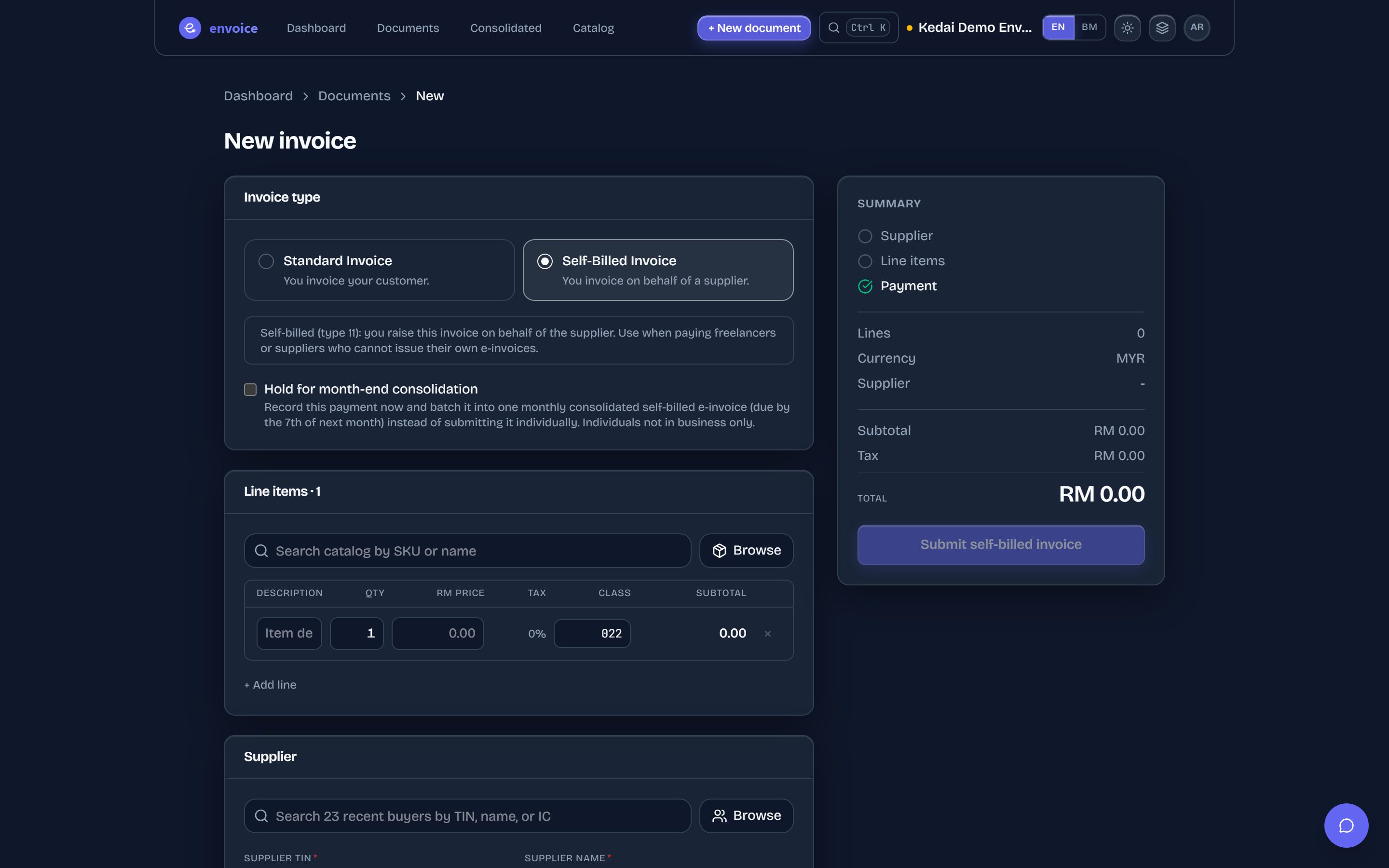
- Click + New document and, under Invoice type, pick Self-Billed Invoice. The buyer section becomes Supplier.
- Add the line items: description, quantity, price and classification code.
- Fill in the Supplier TIN, Supplier name, ID type and number, and address. For a foreign supplier with no Malaysian TIN, envoice uses LHDN's general TIN EI00000000030.
- For a payment to an individual who is not in business, you can tick Hold for month-end consolidation instead of filing it now.
- Click Submit self-billed invoice. It appears in Documents as an Invoice (11), with your business as the buyer and the supplier as the seller.
- Notes follow on their own. A credit, debit or refund note against a self-billed invoice is filed as the self-billed version, code 12, 13 or 14.
- Your details go in as the buyer. envoice puts your shop's TIN and address in the buyer fields and the supplier's details in the seller fields.
- Zoho users. Self-billed bills and vendor credits in Zoho Books, and self-billed purchase orders in Zoho CRM, file through the envoice extension. See envoice for Zoho Books.
One by one or consolidated
Self-billed e-invoices are normally filed one by one. LHDN allows a monthly consolidated self-billed e-invoice only for payments to individuals not in business, interest paid to the public, certain insurance pay-outs and payments to your own overseas branches. Foreign suppliers and agent commissions are filed individually.
Payments you hold with Hold for month-end consolidation go into a monthly consolidated self-billed e-invoice, due within 7 days after the month ends. envoice's automatic monthly filing files them with your other consolidated sales. During the interim relaxation period to 31 December 2027, businesses with turnover up to RM5 million may consolidate self-billed e-invoices for all the cases above.
Full steps and screenshots: help guide Create a self-billed invoice.
Frequently asked questions
When do I need to issue a self-billed e-invoice?
When you pay a foreign supplier, an agent, dealer or distributor, an individual not in business, betting or gaming winners, dividends, certain interest, insurance claims, or capital returns, as listed in section 8.3 of LHDN's Specific Guideline.
What TIN do I use for a foreign supplier on a self-billed e-invoice?
LHDN's general TIN for foreign suppliers, EI00000000030, together with their passport or registration number. envoice fills it in for you.
Should I self-bill my employees' expense claims?
No. LHDN accepts the e-invoice in the employee's name or the existing receipt as proof, and neither employer nor employee has to issue a self-billed e-invoice, overseas expenses included.
Can I consolidate self-billed e-invoices?
Only for payments to individuals not in business, interest to the public, certain insurance pay-outs and your own overseas branches. During the relaxation period to 31 December 2027, businesses up to RM5 million turnover may consolidate all self-billed cases.
Which document type is a self-billed e-invoice?
Type 11. Its credit, debit and refund notes are types 12, 13 and 14, and envoice picks them automatically when you adjust a self-billed invoice.