How to find a company's SSM number (BRN) by company name
Updated 12 November 2026
Short answer
A company's BRN is its SSM registration number, now in a 12-digit format. Look for it on the company's invoices, letterhead or website, ask its accounts team, or search the name on SSM's official e-Info portal. In envoice, type the name in Find BRN by company name, pick the match, and the BRN and TIN fill in.
What the BRN is
The BRN (business registration number) is the number SSM gives a company, a business or an LLP when it registers. On an e-invoice, the BRN is the buyer's or supplier's ID when that party is registered with SSM.
Since 11 October 2019, SSM issues registration numbers in a 12-digit format, such as 201901000005. Older companies kept their old number as well, and SSM shows it in brackets next to the new one, for example 201901000005 (1312525-A). For e-invoicing, use the 12-digit number, without dashes.
Why an e-invoice needs the right BRN
From 1 August 2026, LHDN validates a business buyer's TIN together with its BRN. A business buyer can no longer be filed with "NA" as the BRN, and an old-format number, or the number of a related company, can get the document rejected. envoice stops a Malaysian business buyer with a missing BRN before submission. Foreign business buyers and Labuan entities have no SSM number, so they are not asked for one. The TIN side of this is covered in how to find a TIN number.
Where to find a company's BRN
| Where | What to look for |
|---|---|
| Their invoice, quotation or receipt | Companies usually print the registration number next to or under the company name. |
| Letterhead, email signature or website footer | The same number, often after the company name or labelled as the registration number. |
| Their accounts team | Ask for the TIN and the 12-digit SSM number together. That is exactly the pair LHDN checks. |
| SSM e-Info (ssm-einfo.my) | SSM's official portal. Search by company, business or LLP name, or by registration number. Full results need a sign-in, and company and business profiles are paid documents. |
When you search a name on any register, check the full registered name and the entity type. Many companies share part of a name, and the wrong match gives you a BRN that will not match the buyer's TIN.
Find the BRN by name in envoice
envoice has a company register search wherever you enter a business: on new invoices, on saved customers and on your own shop profile. It finds the SSM number from the name, then runs Lookup TIN on that number.
- Open the form that needs the BRN: the Buyer section of a new invoice (tick Buyer wants individual e-invoice), Customers > + New customer, or Settings > Profile for your own shop.
- In Find BRN by company name, type at least two letters of the company name (or leave it empty to use the name already in the form) and click Find in SSM.
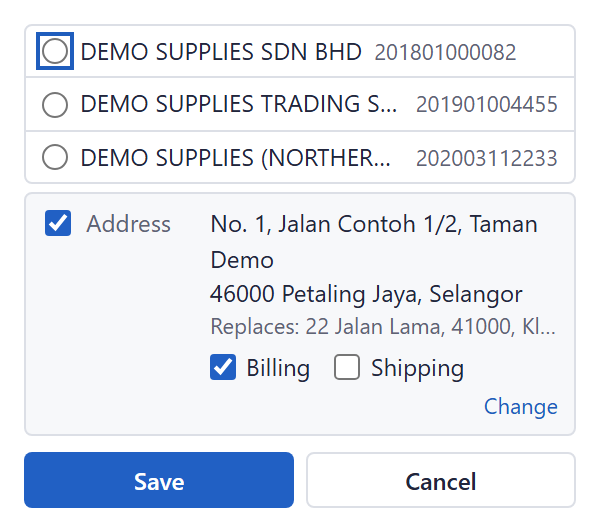
- Pick the company from the list. Each match shows the registered name, the BRN and whether it is a Company, Business or LLP.
- envoice sets the ID type to BRN, fills in the SSM number and runs Lookup TIN to fill in the TIN. If the registered name differs from the one you typed, envoice asks before replacing it.
- Check the details and save the form. Nothing is saved until you do.
On the buyer request portal
Buyers who request their own e-invoice through your portal can use the same search. They choose Company, type the company name and click Search. Picking a match fills in the name and the SSM number, and Lookup TIN then fills the TIN. Each visitor gets a small number of searches at a time, to stop abuse. How the portal works is in how a buyer requests an e-invoice.
What the search does not do
- It finds names in SSM's register only. A foreign company with no Malaysian registration, or a Labuan entity, will not be there.
- A sole proprietorship or partnership has an SSM number, but LHDN does not link a TIN to that number, so Lookup TIN by the BRN may find nothing. For a sole proprietor, look up the owner's TIN by MyKad.
- It returns the name, the registration number and the entity type. It does not fetch company profiles, directors or documents.
- If you see "Not found in SSM.", check the spelling or try a shorter part of the name, or type the details yourself.
- The name you type is sent to the company register search to find matches. The privacy note sits behind the (i) next to the label.
The search is on every plan, including Free. Rules for buyer details are in the help guide Buyer and supplier details LHDN expects, and the rest of the product is on the features page.
Frequently asked questions
How do I find a company's SSM number by name?
Check the company's invoices, letterhead or website, or search the name on SSM's e-Info portal at ssm-einfo.my. In envoice, type the name in Find BRN by company name, click Find in SSM and pick the right company; the BRN and TIN fill in.
Is the BRN the same as the SSM number?
Yes. For e-invoicing, the BRN is the registration number SSM gives a company, business or LLP. Use the current 12-digit format.
Should I use the old or the new SSM number on an e-invoice?
The new 12-digit number, without dashes. SSM has used the 12-digit format since 11 October 2019, and an old-format number is a common cause of TIN and BRN mismatch rejections.
Can I get the TIN once I have the BRN?
Yes, for a company. LHDN's TIN search returns the TIN registered against the 12-digit SSM number, and envoice runs it for you after you pick a company. A sole proprietorship files under the owner's individual TIN, so look that up by MyKad.
Do I pay to search for a BRN?
Not in envoice: the company register search is on every plan, including Free. On SSM's e-Info portal, full search results need a sign-in, and company and business profiles are sold as paid documents.