E-invoice request link and QR code for your customers
Updated 12 November 2026
Short answer
Give buyers a request link or QR code on a counter poster, the receipt footer or your online thank-you page. They type the receipt number, date and total plus their own tax details, and envoice files an individual e-invoice to LHDN MyInvois and emails them the PDF, after you approve it or straight away when the receipt matches a recorded sale.
Why buyers ask for an e-invoice
Most retail buyers are fine with a normal receipt, and their sales go into your monthly consolidated e-invoice under the general public TIN. Some need a document in their own name: a company buying supplies, or a buyer claiming the purchase as a business expense. Taking down a TIN, ID number and full address at a busy counter holds up the queue and invites typos. A request link lets the buyer type their own details later, on their phone.
How the request link works
- Switch on the portal in envoice under Settings > Portal, then share the link or QR code.
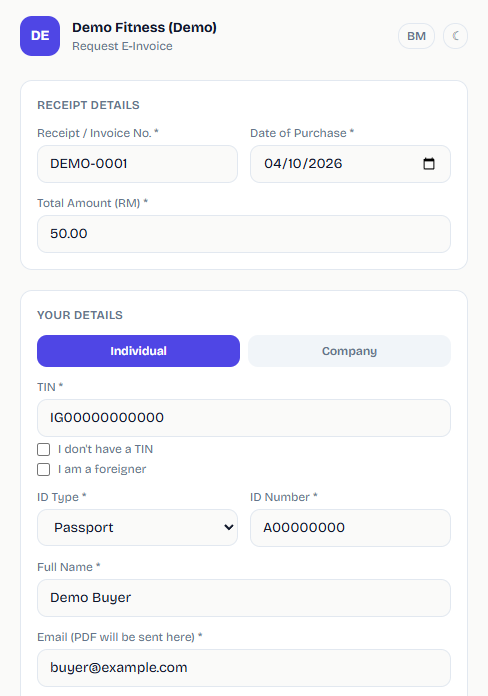
- The buyer opens the link or scans the QR and enters the receipt or invoice number, date of purchase and total.
- They add their own details: individual or company, TIN, ID type and number, name, email and address. The form tells them their details go to LHDN MyInvois only to issue the e-invoice.
- envoice looks for the recorded sale with the same receipt number and amount, and the request lands in Documents > Requests.
- Once the request is approved, envoice files an individual e-invoice to LHDN and emails the buyer the PDF.
Set it up in envoice
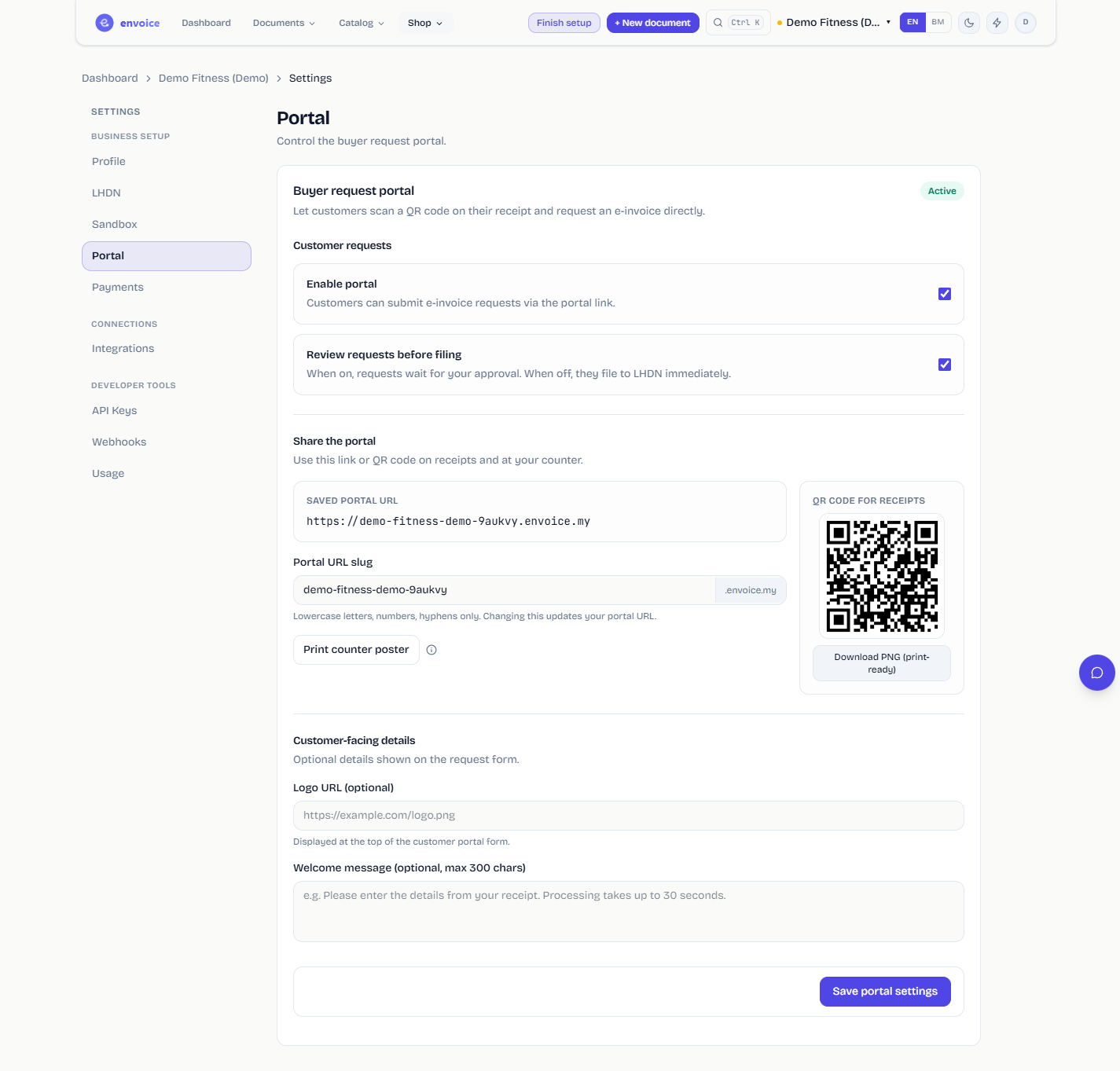
Open Settings > Portal, switch on Enable portal and click Save portal settings. The status at the top changes to Active. Under Share the portal you see the Saved portal URL. You can change the shop part of the link in Portal URL slug. Save before you print anything, because a new slug changes the link.
| Plan | Request link address |
|---|---|
| Free and Starter | envoice.my/request/your-shop |
| Pro and Enterprise | your-shop.envoice.my |
The portal itself comes with every plan, Free included. Only the own-subdomain address needs Pro or Enterprise. Each request you file is an individual e-invoice, so it counts toward your plan's monthly e-invoices.
Where buyers find the link
- Counter poster. Print counter poster opens an A5 PDF with your QR code, ready to stand at the till. Most restaurants and cafes start here.
- Receipt footer. Download PNG (print-ready) gives you the QR image for your receipt template. On Loyverse, paste the link into the receipt Footer under Settings > Receipt in Back Office, and every printed and emailed receipt carries it. Shopify POS can print the link as a footer QR code.
- Online orders. On Shopify, the envoice app adds a Request it link to the thank you and order status pages with the order number filled in, and gives you a line to paste into the order confirmation email. See envoice for Shopify.
- Receipts shared from envoice. A receipt for a consolidated sale that is not filed yet links to your portal, with the receipt number, date and total filled in.
What you control
Review first, or file straight away
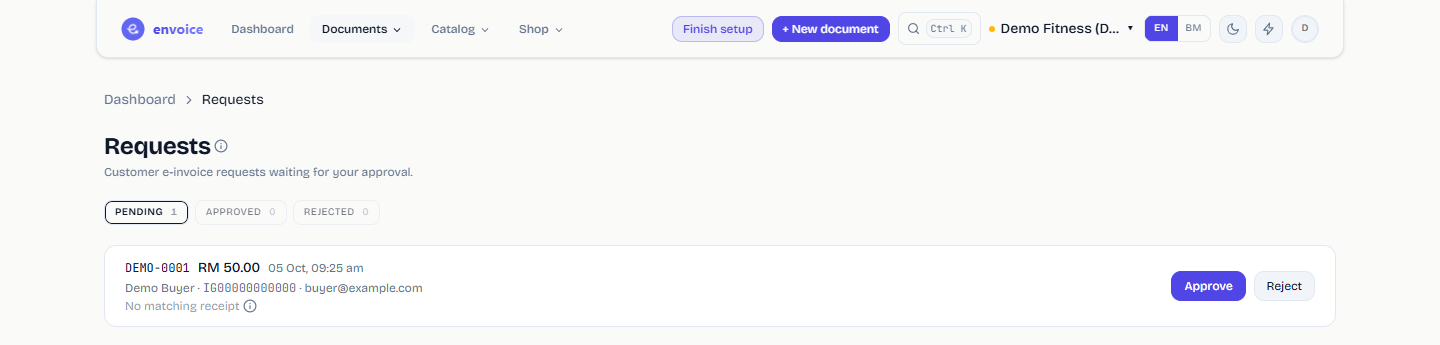
Review requests before filing is on by default. Every request waits under PENDING in Documents > Requests until someone clicks Approve or Reject. Turn it off and a request that matches a sale envoice recorded, with the same receipt number and amount, files to LHDN as soon as it arrives. A request with no match still waits for you.
Matching the receipt
- View receipt means envoice found the sale. The e-invoice uses its line items, and the sale comes out of the month's consolidated e-invoice so it is not reported twice.
- No matching receipt means nothing matched. Approving still files an e-invoice, as one line for the amount the buyer typed, so check the receipt before you approve.
- If that month's consolidated e-invoice is already validated, envoice files a credit note against it before the individual e-invoice.
- To turn a request down, click Reject, type a reason and click Send rejection. The buyer gets the reason by email.
- A receipt can be claimed once. A second request for it under a different email is told to contact the shop.
Who hears about new requests
Under New request emails, pick Each request, Daily summary, 9:00 am or Off, and add up to 5 more addresses in Also send to. With emails off, buyers wait until someone opens Requests.
Old receipts and requests you can decline
Buyers can request an e-invoice for 72 hours after the purchase. After that, or once the sale is already in a filed consolidated e-invoice, the request form no longer accepts the receipt. envoice files every e-invoice with the date and time it is actually submitted, which keeps it inside LHDN's rule that the issue date cannot be more than 72 hours before submission. That is a separate rule from the 72-hour window to cancel a validated e-invoice.
During LHDN's interim relaxation period, which runs to 31 December 2027 for businesses with turnover up to RM5 million, a shop may decline a request for an individual e-invoice as long as it files the consolidated e-invoice. A business below RM3 million is exempt and does not have to issue one at all. Small sellers still working this out can start with e-invoicing for small businesses.
For your buyers
Buyers who want to know what to give and what happens next can read how to request an e-invoice from a shop. Full setup steps with screenshots are in the help guide Let buyers request e-invoices.
Frequently asked questions
How do customers request an e-invoice from my shop?
They open your request link or scan your QR code, enter the receipt number, date and total, then their TIN, ID, name, email and address. envoice files an individual e-invoice to LHDN and emails them the PDF.
Is the e-invoice request portal free?
Yes. The portal comes with every envoice plan, including Free, at envoice.my/request/your-shop. Pro and Enterprise also get their own address such as your-shop.envoice.my. Each filed request counts as an e-invoice on your plan.
Can requests file to LHDN without me approving each one?
Yes. Turn off Review requests before filing. A request that matches a recorded sale by receipt number and amount then files at once. A request with no match still waits for your approval.
Can I print the QR code on my receipts?
Yes. Download the print-ready PNG for your receipt template, or paste the link into your POS receipt footer, for example the Footer field in Loyverse receipt settings. A printable A5 counter poster is also available.
Will the sale be reported twice, in the consolidated e-invoice and the individual one?
No. When envoice matches the request to a recorded sale, it takes that sale out of the month's consolidated e-invoice. If that consolidated e-invoice was already validated, envoice files a credit note against it first.