How to do e-invoicing as a small business in Malaysia
Updated 12 November 2026
Short answer
Start with your annual turnover: below RM3 million you are exempt, unless one of three group-company exceptions applies. If you must or choose to issue e-invoices, get your MyInvois Client ID and Client Secret, file one consolidated e-invoice a month for customers who do not ask, and issue an individual e-invoice when a buyer asks for one.
This guide is for corner shops, stalls, online stores and home businesses. Work through it in order. Many small sellers can stop after step 1.
The steps at a glance
- Check whether you need to: annual turnover below RM3 million is exempt, apart from three group-company exceptions.
- If you are in scope, or choose to issue e-invoices, get your MyInvois Client ID and Client Secret.
- Walk-in customers who do not ask: give a normal receipt and file one consolidated e-invoice a month, within 7 days after the month ends.
- Buyers who ask for their own: issue an individual e-invoice with their details, or let them fill it in through a request link or QR code.
- If you are in Phase 4 (RM3 million to RM5 million), know what the relaxation period to 31 December 2027 allows.
Step 1: Check whether you need to
Under LHDN's e-Invoice Guideline version 4.8 (published 30 August 2026), taxpayers with annual turnover or revenue below RM3 million are exempt from issuing e-invoices. That covers every type of taxpayer: individuals, partnerships, companies and co-operatives.
The exemption does not apply if your business:
- has a non-individual shareholder with turnover or revenue of at least RM3 million,
- is a subsidiary of a holding company with turnover or revenue of at least RM3 million, or
- has a related company or joint venture with turnover or revenue of at least RM3 million.
LHDN uses your 2022 figures: the turnover in your audited financial statements for financial year 2022, or the revenue in your tax return for year of assessment 2022 if you have no audited accounts. New businesses have their own rules. Run your numbers through the e-invoice phase checker, or read the full RM3 million exemption explainer.
Step 2: Get your MyInvois credentials
If you are in scope, or choose to issue e-invoices, your system has to connect to LHDN's MyInvois. You do this once. Log in to MyTax, open MyInvois, go to Representatives, the ERP tab, and click Register ERP. Copy the Client ID and Client Secret, paste them into envoice under Settings > LHDN and click Save and verify. Every screen is in the MyInvois credentials guide, and what the two values do is explained in MyInvois Client ID and Client Secret.
You do not need to buy a digital certificate. envoice submits through the MyInvois v1.0 API, which needs only the Client ID and Client Secret. A new envoice shop starts in test mode, so you can try the whole flow before anything goes to LHDN.
Step 3: Walk-in customers who do not ask
Most customers of a small shop never need an e-invoice. Give them a normal receipt. It is not an e-invoice and is not sent to LHDN on its own. At month end, all those sales go into one consolidated e-invoice, with the general public TIN EI00000000010 as the buyer. File it within 7 calendar days after the month ends: October sales are due by 7 November.
In envoice, on the new invoice form, under Who is this sale for?, choose Walk-in or general public. Customer name, phone and address are optional. The sale waits as a pending sale for that month's consolidated e-invoice.
You do not have to remember the deadline. envoice files last month's consolidated e-invoice for you on the 4th of each month, or the day you pick from the 1st to the 7th under Settings > LHDN (Submit on), and emails the shop owner the result. If LHDN rejects it, the sales stay pending and envoice tries again the next day. To file by hand, turn off Auto-file monthly consolidated e-invoice and click Submit consolidated invoice on the Consolidated page. Full steps: Submit a monthly consolidated e-invoice.
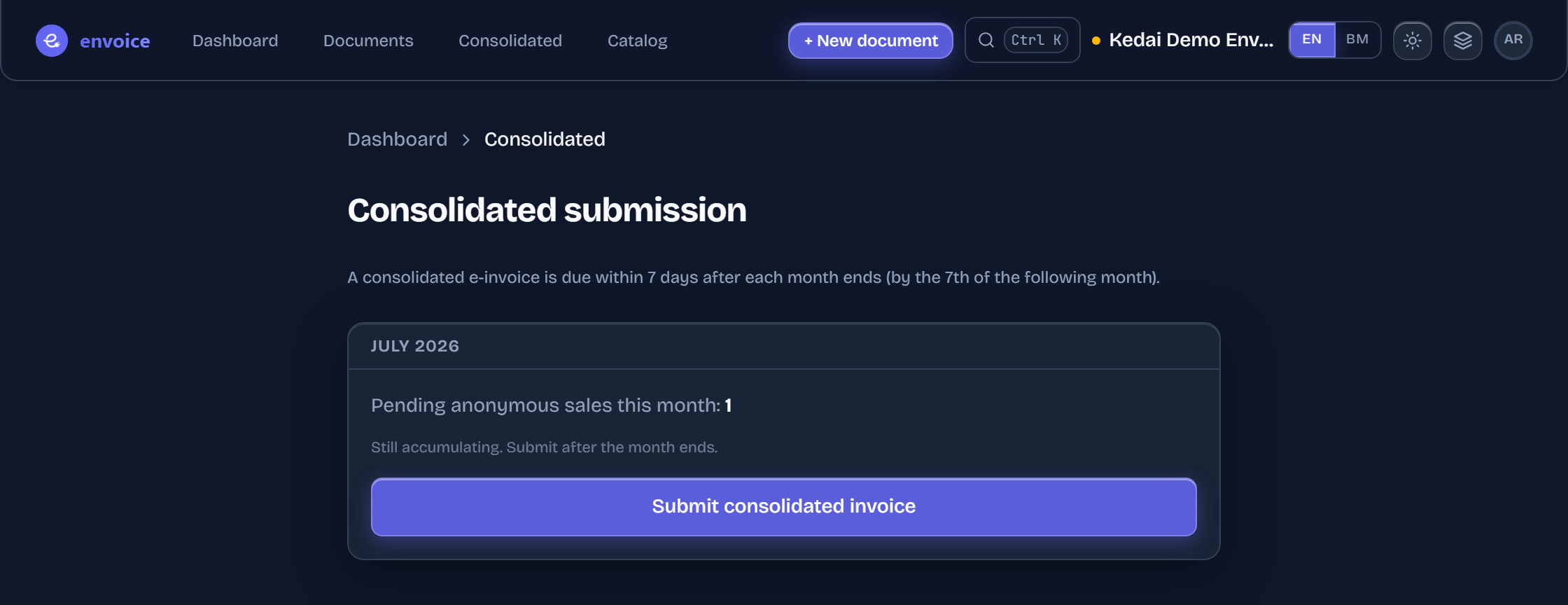
envoice's Free plan is RM0 and covers 50 e-invoices and 150 consolidated sales a month. Sales past the limit are still recorded.
Step 4: When a buyer asks for their own e-invoice
A corporate customer, or anyone claiming the purchase as a business expense, may ask for an e-invoice in their own name. That is an individual e-invoice, and you need the buyer's details:
- Their TIN. A Malaysian individual without a TIN can use the general TIN EI00000000010 with their MyKad number.
- ID type and number: the 12-digit SSM registration number for a business, or MyKad, passport or army number for an individual.
- Name, address and contact details.
At the counter, choose Named buyer on the invoice form and enter their TIN, name and ID. If you already recorded the sale as a walk-in and it is in a consolidated e-invoice, open the sale and click Issue individual e-invoice. envoice issues a credit note against the consolidated e-invoice, then a new individual e-invoice for the buyer.
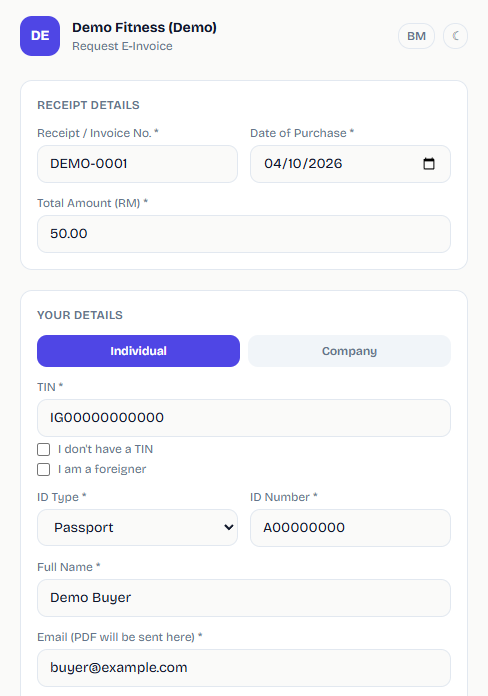
Less typing for you: let the buyer fill it in. Switch on the request portal and put the QR code at the counter or on your receipt. The buyer scans it, enters the receipt and their tax details, and envoice files the e-invoice and emails them the PDF. See the e-invoice request link and QR code.
Step 5: The Phase 4 relaxation period
A business with turnover of RM3 million to RM5 million is in Phase 4, mandatory from 1 January 2026. The interim relaxation period for taxpayers with turnover up to RM5 million runs until 31 December 2027. During it, LHDN's e-Invoice Specific Guideline (section 16) lets you:
- issue a consolidated e-invoice for all your transactions, including industries that normally cannot consolidate,
- issue a consolidated self-billed e-invoice for all self-billed circumstances,
- put any description in the consolidated e-invoice, instead of listing receipt numbers, and
- decline a buyer's request for an individual e-invoice, as long as you file the consolidated one.
LHDN will not prosecute under Section 120 of the Income Tax Act 1967 during this period, provided you file the consolidated e-invoices. The relaxation is not a pause. You still submit every month.
Frequently asked questions
Do small businesses in Malaysia have to issue e-invoices?
Not if your annual turnover or revenue is below RM3 million, unless you have a non-individual shareholder, a holding company, or a related company or joint venture with turnover of at least RM3 million. You can still issue e-invoices voluntarily.
Do I need an e-invoice for every walk-in customer?
No. Give customers who do not ask a normal receipt, and file one consolidated e-invoice for all those sales within 7 calendar days after the month ends.
Do I need to buy a digital certificate?
Not with envoice. It submits through the MyInvois v1.0 API, which needs only the Client ID and Client Secret from MyInvois.
Can I decline a request for an individual e-invoice?
During the relaxation period to 31 December 2027, a business with turnover up to RM5 million may decline individual e-invoice requests as long as it files the consolidated e-invoice. An exempt business below RM3 million does not have to issue one at all.