MyInvois Client ID and Client Secret: how to connect MyInvois to your software
Updated 12 November 2026
Short answer
Software connects to LHDN MyInvois with two values from your own MyInvois profile: a Client ID and a Client Secret. Log in to MyTax, open MyInvois, go to Representatives, ERP tab, Register ERP, then copy the Client ID and Client Secret 1, which are shown only once, and paste them into the software. No digital certificate is needed for envoice.
What the Client ID and Client Secret are
They work like a username and password for a system, not a person. Your POS, accounting system or e-invoice software uses them to log in to the MyInvois API and submit e-invoices under your company's TIN. You create them yourself in the MyInvois portal by registering an ERP system. Nobody at LHDN emails them to you.
The Representatives section in MyInvois has separate tabs for users, ERP systems and intermediaries. To connect envoice you use the ERP route: register it under your own company and paste the credentials into envoice. You do not need to appoint envoice as an intermediary.
Get them from the MyInvois portal
- Log in at mytax.hasil.gov.my with a MyTax account that can open your company's tax profile, then click MyInvois in the top menu.
- On the taxpayer profile, go to Representatives, open the ERP tab and click Register ERP.
- Type an ERP Name you will recognise, such as envoice, pick a Client Secret expiration, leave Primary ERP System unticked unless this is your main system, and click Register.
- Copy the Client ID and Client Secret 1 straight away. MyInvois shows the secrets only once.
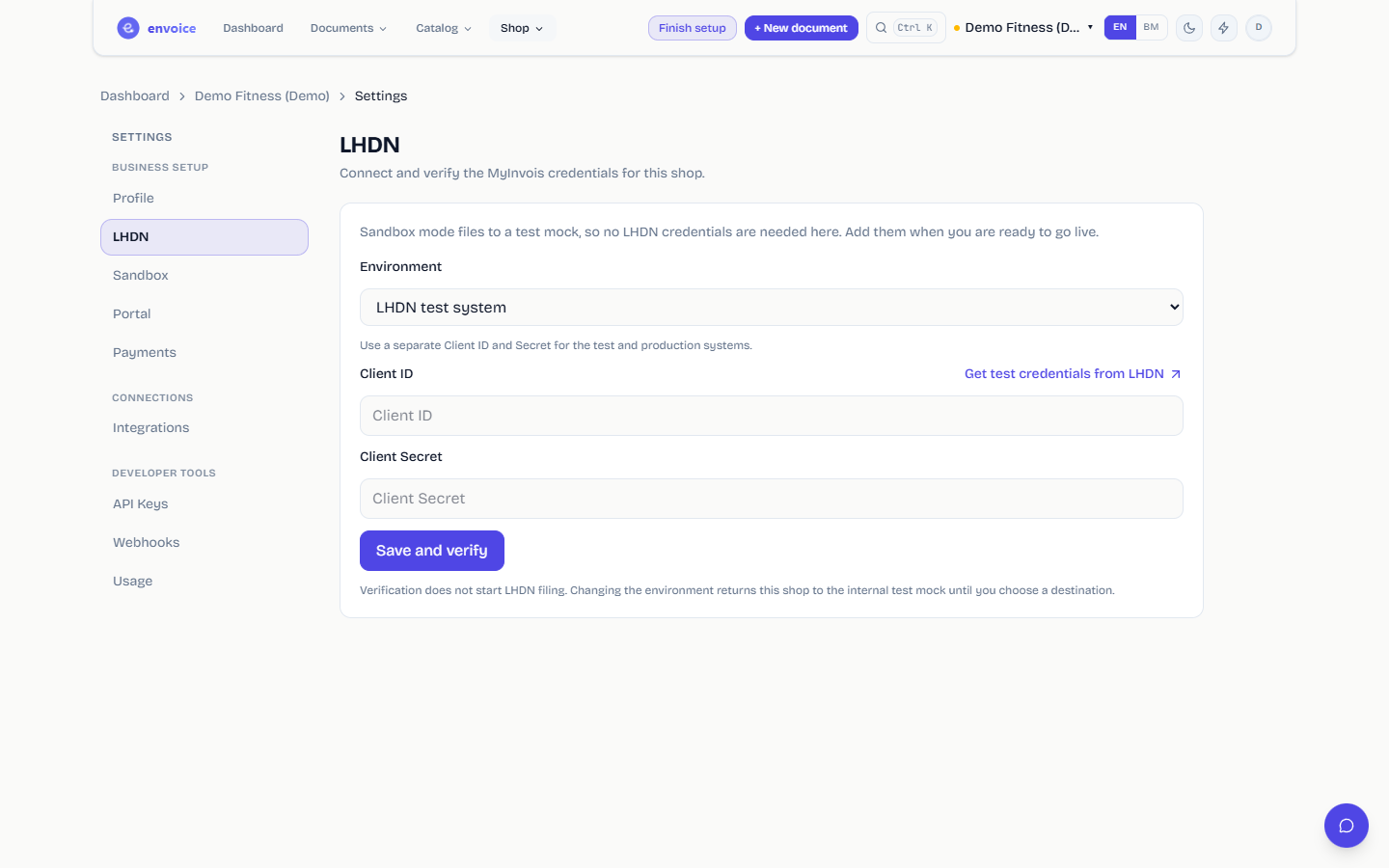
- In envoice, open Settings > LHDN, choose the environment, paste both values and click Save and verify.
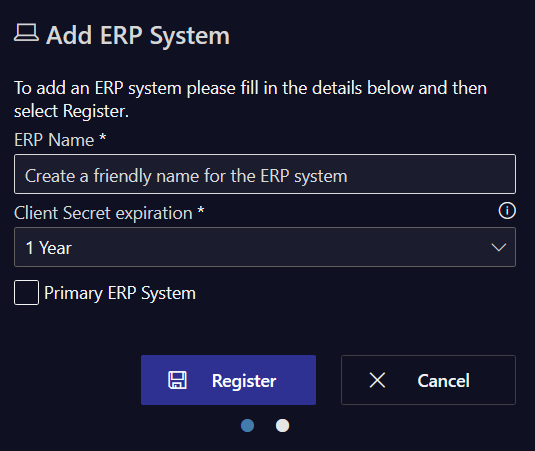
MyInvois gives you Client Secret 1 and Client Secret 2. Both work and both expire on the same day; the second is a spare. Use Client Secret 1. Tick that you have saved them before you click Done, because the portal will not show them again.
On a computer with Chrome, the free envoice LHDN helper does the same steps for you: it opens MyInvois, registers envoice as the ERP system and brings the two values back into envoice for you to check and save. For a version of these steps with every portal screen, see the LHDN credentials guide.
Test credentials and production credentials
| Test (sandbox) | Production | |
|---|---|---|
| Where you get them | LHDN's pre-production portal, preprod.myinvois.hasil.gov.my, after registering your company there | MyInvois, opened from MyTax |
| What gets filed | Test documents only. Nothing counts for tax. | Real e-invoices under your TIN |
| In envoice | Environment: LHDN test system | Environment: LHDN production system |
Test and production need separate credentials. A test Client ID will not log in to production, and the other way round.
Paste them into envoice
Open Settings > LHDN, pick the Environment, paste the Client ID and Client Secret, and click Save and verify. envoice checks them with LHDN and shows the date and time they were verified. Saving does not start filing on its own. You then choose where documents go under Settings > Sandbox.
- envoice submits through the MyInvois v1.0 API, so you do not need a digital certificate.
- Register the ERP under the same TIN as the shop in envoice. Credentials from another company's profile are rejected.
- When the secret expires, every submission fails. Generate a new one in MyInvois and paste it into envoice.
- To update only the Client ID later, leave the Client Secret field blank to keep the current one.
Screens and error messages are in the help guide Enter your LHDN credentials. New to e-invoicing? Start with e-invoicing for small businesses.
Frequently asked questions
Where do I find my MyInvois Client ID and Client Secret?
In the MyInvois portal, opened from MyTax: go to Representatives, the ERP tab, and click Register ERP. The Client ID and Client Secrets appear after you register.
I lost my Client Secret. Can I see it again?
No. MyInvois shows the secrets only once. Register a new ERP or generate a new secret, then paste the new one into your software.
Which secret do I use, Client Secret 1 or 2?
Use Client Secret 1. Both work and both expire at the same time; the second is a spare.
Do I need a digital certificate to connect envoice to MyInvois?
No. envoice submits through the MyInvois v1.0 API, which needs only the Client ID and Client Secret.
Can I use the same credentials for testing and production?
No. Test credentials come from LHDN's pre-production portal and only work there. Production credentials come from MyInvois in MyTax.