Separate number series for self-billed, credit, debit and refund notes
Audience: Shop owner (Admin), Accountant Time: 2 minutes
By default every document in a shop shares one number sequence. If your accountant wants credit notes numbered CN-0001, CN-0002... apart from your invoices, or self-billed invoices in their own series, switch on separate numbering for that document type.
1. Open the numbering settings
Open Settings > Profile and click More settings. Under Invoicing you set your main numbering: Sale number prefix, Date in number, Separator, Digits, Reset counter and Start number. The line Next number will look like: previews the result.
Below it is Separate numbering.
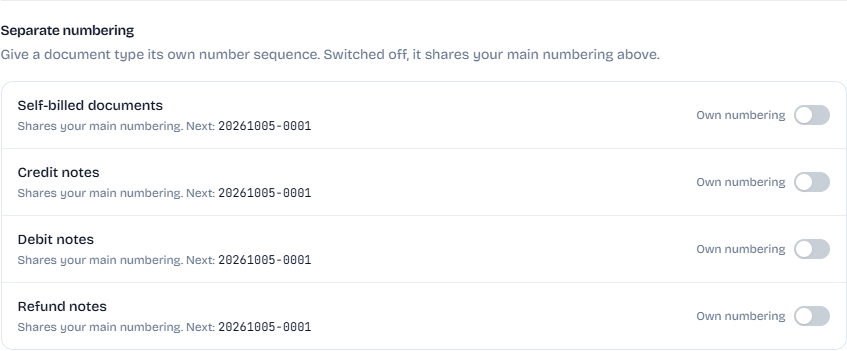
Each row shows the next number that type will get. While Own numbering is off, it says Shares your main numbering.
2. Turn on own numbering for a type
You can do this for Self-billed documents, Credit notes, Debit notes and Refund notes.
- Switch on Own numbering for the type.
- Enter a Prefix of 2 to 8 letters or digits, for example
CN. - Optional: set Start from if the series should not begin at 1 (for example, to carry on from your old system).
- Check the preview, for example Own numbering. Next: CN-20261005-0001.
- Click Save business details.
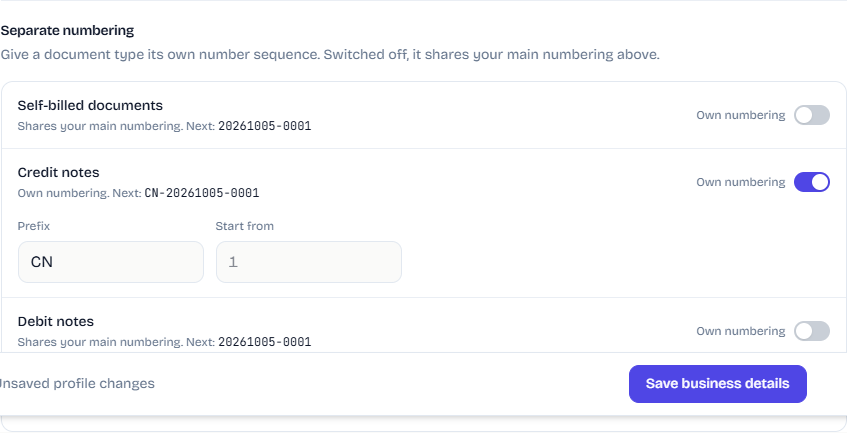
The series uses the same date, separator, digits and reset settings as your main numbering. Only the prefix and the counter are its own.
Rules envoice checks
- The prefix must be 2 to 8 letters or digits.
- The prefix cannot be too close to your main prefix or another series, so two series can never produce the same number. If it is, envoice asks you to choose a different one.
- Start from must be a whole number of 1 or more. Like the main start number, it applies while the series has no documents yet.
Good to know
- The change applies to documents you create from now on. Numbers already issued do not change.
- Switch Own numbering off again to go back to the shared sequence.
- Credit and debit notes are available from the Starter plan. See Credit and debit notes.