Excel e-invoice upload: file your sales sheet to LHDN with envoice
Updated 12 November 2026
Short answer
Keep one row per item sold with an invoice number, date, description, quantity and amount, then upload the sheet in envoice under Documents, Upload CSV. envoice detects it as an Excel sales listing, reads amounts like RM 1,250.00 and tax written as Service Tax 8% or Nil, and files the e-invoices to MyInvois.
Step 1: set up your sheet
One row per item sold. Put these headers in the first row; the order does not matter, and title rows above the header are skipped.
| Column | Example | Needed? |
|---|---|---|
| Invoice No | INV-1001 (repeat it on every line of the same invoice) | Yes |
| Date | 03/11/2026, 3-Nov-2026 or a real Excel date | Yes |
| Description | Monthly membership | Yes |
| Qty | 4 | Yes |
| Amount | RM 480.00 (the line total before tax) | Yes |
| Unit Price | 120.00 | Optional; without it envoice uses Amount divided by Qty |
| Customer, TIN, BRN | Demo Fitness Sdn Bhd, C00000000040 | Only for buyers who want their own e-invoice |
| Tax Code | Service Tax 8%, SST 8, Sales Tax 10, Exempt, Nil | Optional |
| Tax Rate or Tax Amount | 8 or 38.40 | Optional |
Step 2: upload it to envoice
- Sign in to envoice and open Documents, then Upload CSV.
- Choose the file you exported. Excel (.xlsx) and CSV both work, up to 20,000 rows and 5 MB.
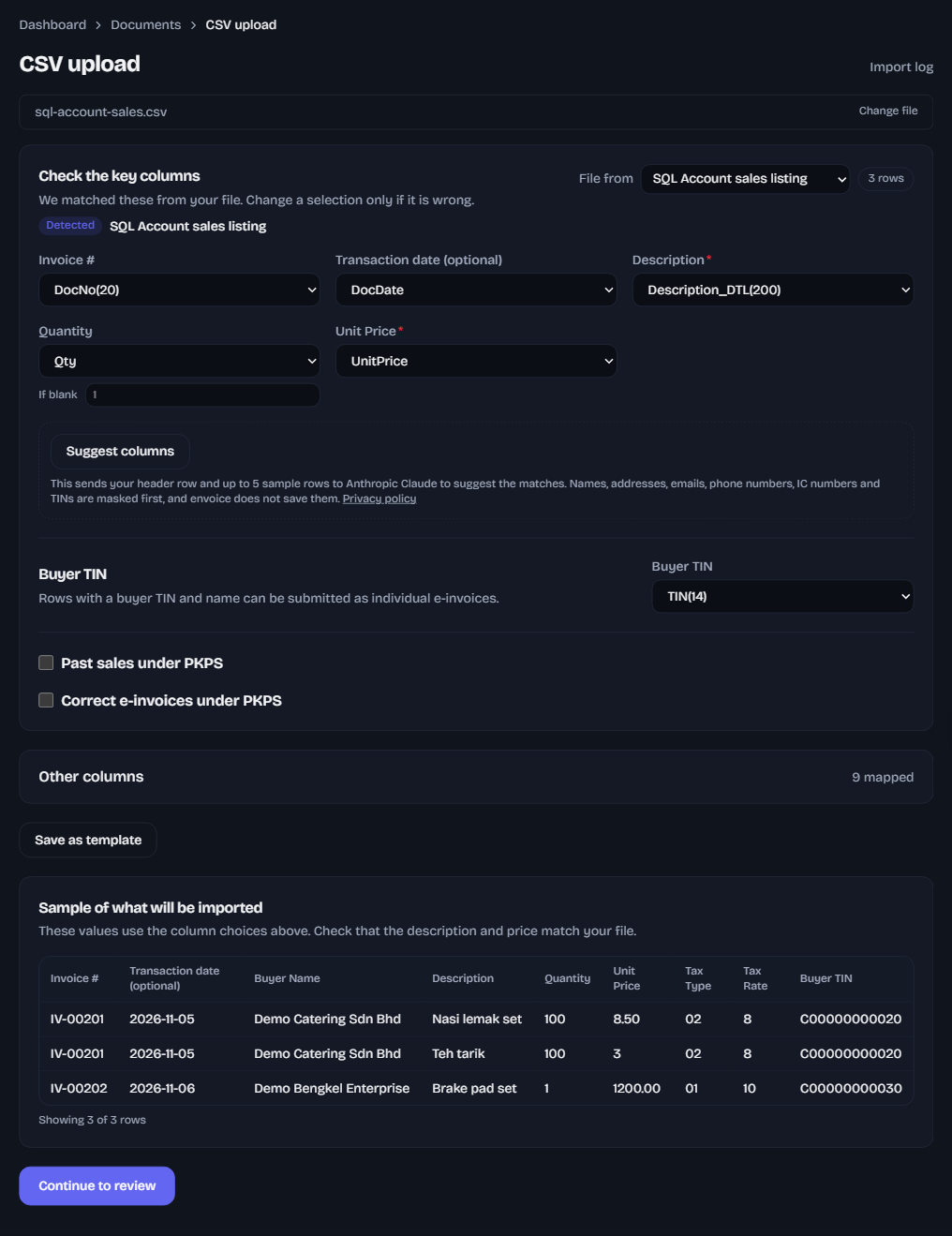
- envoice reads the header row and shows Detected: Excel sales listing, with the columns already picked.
- Check the sample at the bottom: invoice number, date, description, quantity, unit price, tax type and rate. Change any column that looks wrong.
- Click Continue to review. envoice lists any row it will skip and every field to fix in it.
- Click Submit all rows. Sales with a buyer TIN file as their own e-invoices; sales without one wait for your monthly consolidated e-invoice.
What envoice cleans up for you
- Dates are read day first, so 03/04/2026 is 3 April. A date typed as a real Excel date works too.
- RM and thousands commas are dropped from amounts.
- Sales without a TIN go into your monthly consolidated e-invoice; sales with a TIN and name file as their own e-invoices.
- Tax and totals are worked out again from each line, so check the sample against your sheet.
Your column names are different? Upload anyway: pick each column in the dropdowns and save it as a template for next month. See the CSV upload guide. Filing months you missed? See late or missed e-invoices.
Frequently asked questions
Do I have to use envoice's template?
No. Any sheet with an invoice number, date, description, quantity and amount is detected as an Excel sales listing. For other layouts you pick the columns once and save them as a template.
Can one invoice have several lines?
Yes. Rows with the same invoice number become one e-invoice with several lines.
Does envoice change anything in my accounting software?
No. envoice only reads the file you upload. Your accounting records stay as they are, and envoice keeps the LHDN UUID and validation link for each e-invoice it files.
What if a column is picked wrongly?
Every column stays in a dropdown you can change before you submit, and you can save your choices as a template for next month. The sample at the bottom updates as you change them.