Reconcile supplier e-invoices with the bills in your books
Updated 16 November 2026
Short answer
Export your supplier bills as CSV or Excel and upload them in envoice under Purchases, Reconcile. envoice compares them with the e-invoices suppliers filed to your TIN in MyInvois and shows which bills match, which differ in amount or date, which have no e-invoice yet, and which e-invoices are not in your books.
From the supplier side, every purchase you claim should come with a validated e-invoice. In practice some suppliers file late, some file the wrong amount, and now and then someone files an e-invoice to your TIN that was never yours. MyInvois lists what was filed to you, but it does not know what you recorded. Your books know what you recorded, but not what was filed. Reconcile puts the two side by side.
How it works
- Export your supplier bills for the month from your accounting system as CSV or Excel: supplier TIN, supplier name, the supplier's invoice number, date and total.
- In envoice, open Purchases and click Reconcile.
- Pick the bill dates and choose your file. envoice picks the columns from the header row, and you can change any of them.
- Click Reconcile. Every bill and every e-invoice from LHDN lands in one of four groups.
- Export the result to CSV or Excel for your accountant, or open any e-invoice to reject it while the 72 hours are still open.
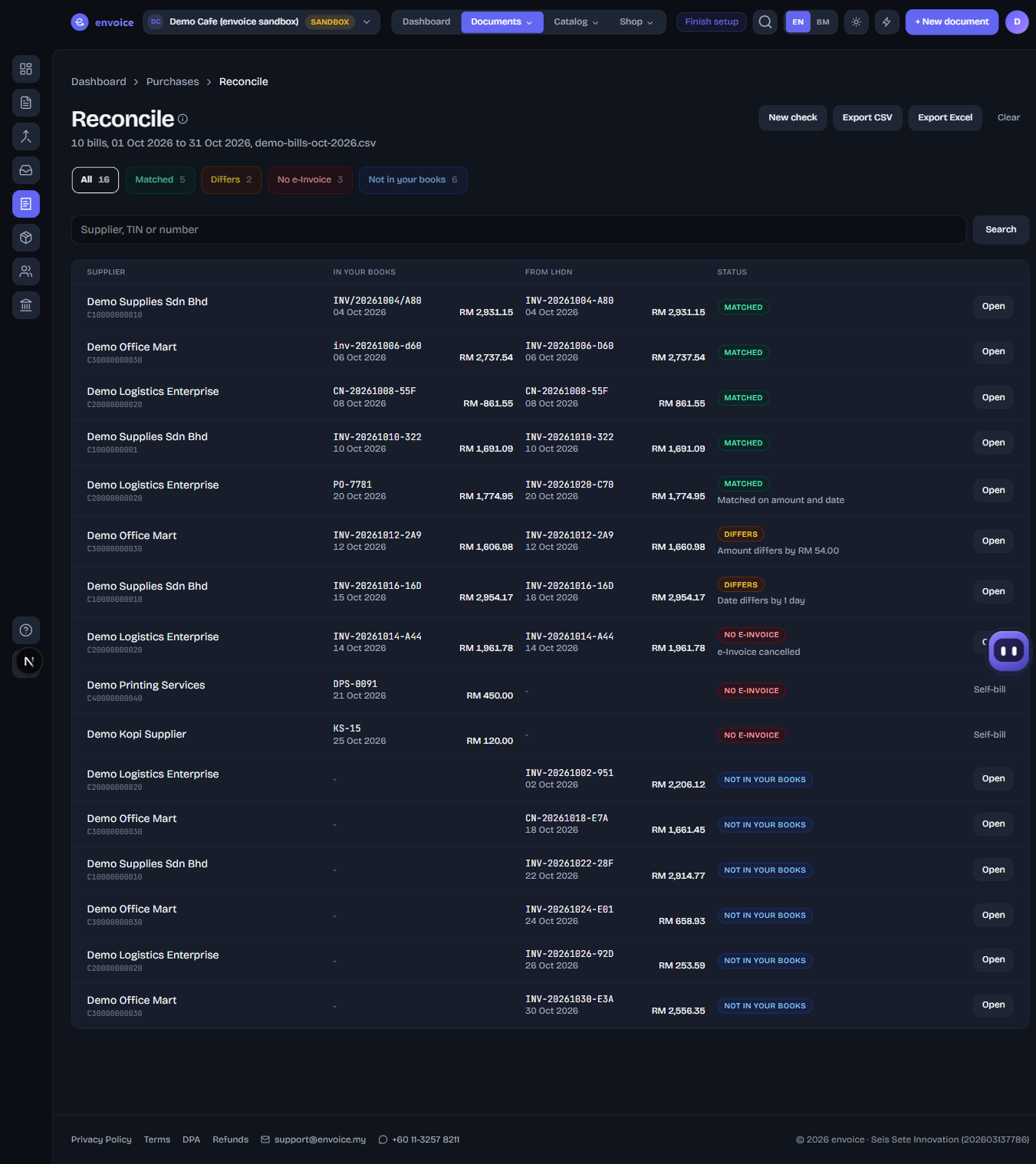
The four groups
| Group | What it means | What to do |
|---|---|---|
| Matched | Same supplier, same invoice, same day, amount within 5 sen | Nothing |
| Differs | Same invoice, but the amount or the date is different | Check with the supplier. A wrong e-invoice has to be cancelled and filed again by them |
| No e-Invoice | A bill in your books with no valid e-invoice from LHDN | Ask the supplier to file it. If the supplier is exempt or abroad, you may need a self-billed e-invoice |
| Not in your books | An e-invoice filed to your TIN with no bill in your books | Record the bill, or reject the e-invoice within 72 hours of validation if it is not yours |
Matching that copes with real bill lists
- Invoice numbers match when only case, spaces, punctuation or leading zeros differ, so inv/00123 and INV-123 are the same bill.
- When your books hold your own reference instead of the supplier's number, envoice matches on the same supplier, the same amount and a date within 3 days, and says so on the row.
- An old-style company TIN without the trailing 0 still matches the TIN on the e-invoice.
- A bill whose e-invoice was cancelled or rejected shows as having no e-invoice, because the supplier owes you a new one.
- Negative vendor credits in your books match the supplier's credit notes.
- Title rows at the top of an export and a totals row at the bottom are skipped.
If your shop is connected to Zoho Books, click Pull from Zoho Books instead of uploading a file. envoice reads the bills dated in your period and each vendor's TIN, and leaves draft and void bills out. Step by step in the help guide. For suppliers who cannot issue e-invoices, see how to file a self-billed e-invoice.
Frequently asked questions
Where does envoice get the e-invoices my suppliers filed?
From MyInvois, with your own Client ID and Client Secret. envoice copies the e-invoices filed to your TIN into Purchases and checks for new ones every hour, so Reconcile always compares against the latest list.
Does envoice change my accounting records?
No. It only reads the file you upload, or the bills it reads from Zoho Books. Nothing is written back.
How long does envoice keep my bill list?
For 30 days, so the result is still there when you come back. Starting a new check replaces it, and Clear deletes it at once.
Why reject within 72 hours?
LHDN lets a buyer ask for an e-invoice to be rejected only within 72 hours of validation. After that the supplier has to issue a credit note instead. Reconcile shows the hours left on each e-invoice that is not in your books.